

Salesforce's State of Sales puts actual selling at 28% of a rep's week. The rest is admin, meetings, and data entry, and follow up is the first thing to slip. Sequences fix that. Define once what goes out, when, and what happens if the customer replies, and the platform runs it for every single person. You can now build them in Frontline, over email, WhatsApp, or both, without leaving the platform your customers are already in.
What's a sequence (and what isn't one)
A sequence is a set of steps that run on a person once a trigger fires. Enroll them (you, a rule, or an AI agent) and the platform takes over: send an email, wait two days, check for a reply, send a WhatsApp if there isn't one, task the rep if there is. Every step is a node. Nodes chain into a visual flow anyone can read.
It's not a blast. A campaign hits a list once and it's over. A sequence is one to one, and each person moves at their own pace. It's not a bot either. A bot answers when someone writes in. A sequence makes the first move when something happens, or when nothing happens for too long.
The nodes you get in Frontline:
- Send email: templated email, sent from the connected Gmail or Outlook account of whoever enrolled the contact.
- Send WhatsApp message: an approved WhatsApp template to the contact's number.
- Wait: hours or days, your call.
- Condition: branch on something like replied or didn't.
- Task: create a task for a human, with an owner and due date.
- Data action: update the record. Move a stage, change a field, add a tag.
- Trigger workflow: kick off a Frontline Studio workflow from inside the sequence, for anything heavier or agent driven.
Why sequences belong where your data lives
The old setup: export contacts, import them into a sequencing tool, send from there, and (if someone remembers) load the results back in.
Three things break.
Context. A sequence doesn't think. It runs your steps and takes whichever branch matches what the person did. But to enroll the right people, fill each message with real data, and log what happened, it has to sit on top of the data. Outside your system of record, every send goes out from a stale copy, and every reply, task, and stage change gets keyed back in by hand.
Audience. In an external tool, your audience is a list frozen on export day. On the platform, it's a live filter. "Proposal sent 5+ days ago, no reply" picks up whoever lands there tomorrow and drops whoever already closed. That's what turns a sequence into a process instead of a one off.
Sprawl, which is also cost. One more license, one more integration to babysit, one more product to learn, all to do something that should launch from the record you already have open. Gartner research found that 70% of more than 1,000 B2B sellers feel overwhelmed by the technology they need to do the job, and that overwhelmed sellers are 45% less likely to hit quota.
So sequences in Frontline aren't a bolt on. Same objects, same fields, same conversations. A sequence email shows up in the contact's timeline like any other email. A sequence WhatsApp lands in the chat your team already uses with that customer. A data action at the end leaves the record clean without anyone touching it.
Sequences by team
Sequences started in sales, but "act, wait, check, act" shows up anywhere a team talks to customers.
Sales: after the demo
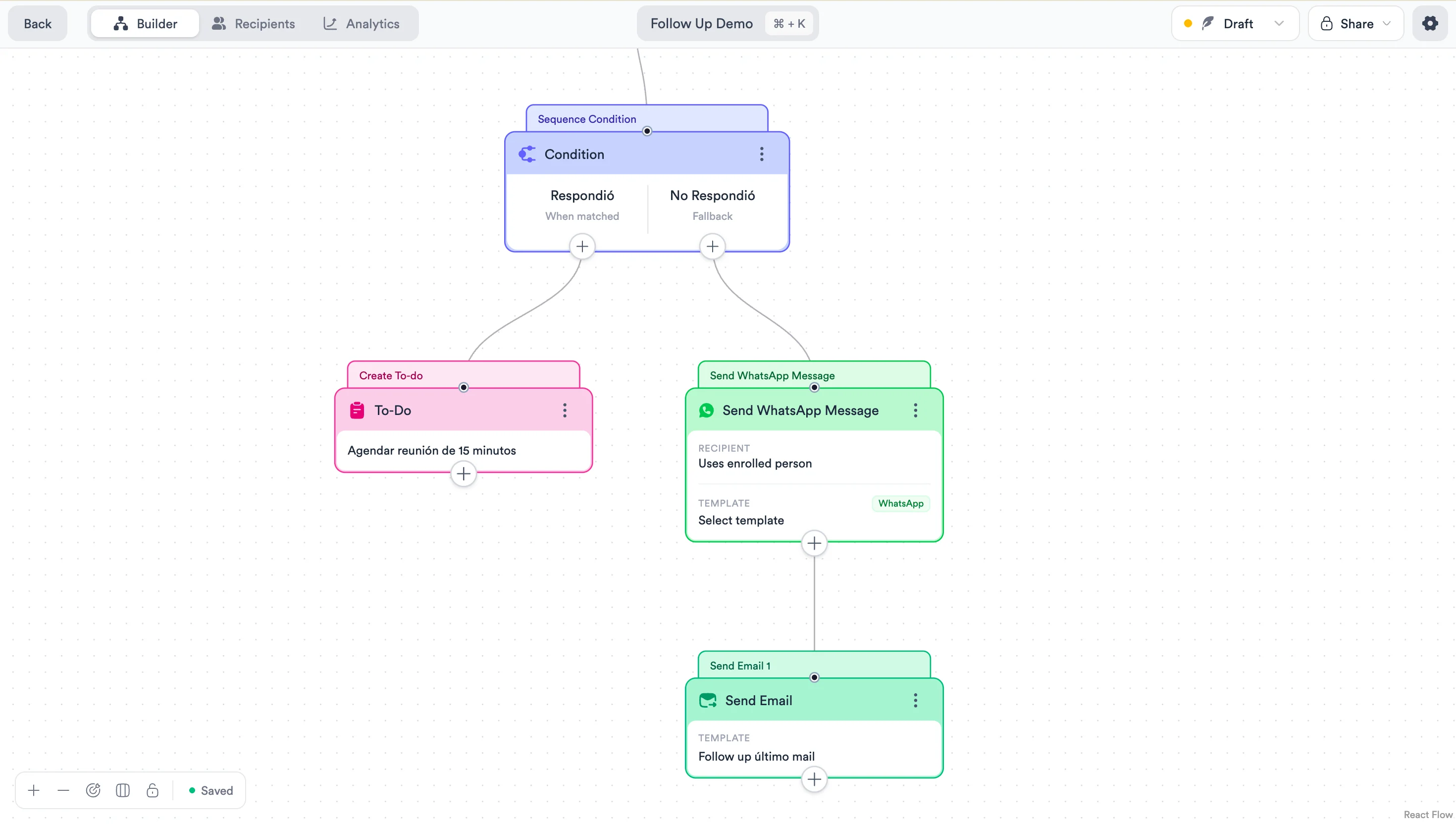
The flow in the screenshot. Enrolled when the demo ends. Follow up email same day, wait 48 hours, check for a reply. Replied: the rep gets a task to book a short call. Didn't: a short WhatsApp, then one last email if there's still nothing.
The point isn't the number of touches. It's that none of them depend on the rep remembering. Harvard Business Review audited 2,241 companies on lead response time: the average was 42 hours, and 23% never responded at all. Old study, unsolved problem. A sequence starts at minute zero.
Marketing: nurture and win back
A webinar leaves you 200 registrants and 50 attendees. Without sequences: one generic thank you email, then hope. With sequences: attendees get the recording and, three days later, a case study from their industry. No shows get the recording with a different subject line and a different branch. Anyone who replies gets marked as qualified by a data action and routed to a rep by a task.
Win back works the same way. No activity in 90 days puts a contact into a short sequence alternating email and WhatsApp. What matters here is real personalization, not a first name in the greeting. McKinsey found 71% of consumers expect personalized interactions and 76% get frustrated when they don't get them. Real personalization means knowing what they looked at, who they talked to, and what they were promised. That only works if the sequence reads the record.
Collections: staged reminders, no awkward calls from sales
Invoice due tomorrow: WhatsApp reminder with the amount and a payment link. Still unpaid at day five: formal email, invoice attached. Day ten: second WhatsApp, plus a task for finance to call. The moment the payment is logged, the sequence stops on its own.
The customer gets consistent, timely messages. Nobody on the team keeps a mental ledger of who owes what. For insurers, financial services firms, or healthcare companies with hundreds of due dates a month, that's the gap between collecting on time and collecting at 60 days.
Operations: documents without the chase
Every regulated business asks for paperwork, and every regulated business has someone sending the third "just a reminder, we're still missing..." email. A sequence does that job: request by email, nudge on WhatsApp at 72 hours, escalate to a task after a week, and once the file lands on the record, a data action closes the request and triggers the next onboarding step.
For a private bank, an insurer, or a health plan, it also leaves an audit trail: every request, reminder, and reply in the customer's timeline. Frontline is SOC 2 and CASA Tier 2 certified, in case compliance asks where that data lives.
| Team | Trigger | Channels | Key condition | What happens at the end |
|---|---|---|---|---|
| Sales | Demo ends or proposal sent | Email + WhatsApp | Did they reply? | Task to book a call or close the follow up |
| Marketing | Registration or inactivity | Email + WhatsApp | Did they attend or engage? | Qualified lead routed to sales |
| Collections | Invoice nearing its due date | WhatsApp + email | Was payment logged? | The sequence stops or creates a task |
| Operations | Missing documentation | Email + WhatsApp | Was the document uploaded? | Close the request and trigger the next step |
Mixing WhatsApp and email
Mixing channels is where sequences pay off most, and where a few rules matter.
Email is for anything long, attached, or formal. Templates are built on the spot, by hand or with AI, with variables like name and company, and each send goes out as a new email or as a reply in the previous thread. Reply in thread is what makes a follow up read like a person wrote it: the customer sees the whole conversation in one place. Add the sender's signature and, where it makes sense, an unsubscribe link.
WhatsApp is for short and urgent, and it plays by Meta's rules. Outside the 24 hour window opened by the customer's last message, a business can only send an approved template, and every template is categorized as marketing, utility, or authentication with rates that vary by category and country. A payment reminder or a document request is utility, the cheaper tier. Anything promotional gets billed as marketing, even if you tagged it utility. And from October 1, 2026, Meta also charges for service messages inside the 24 hour window on the business platform, past a free allowance of 1,000 per number per month.
Takeaway: don't use WhatsApp for everything. Email what can wait. Save WhatsApp for the step where silence is the problem. Frontline is a Meta Business Partner and manages templates in the same platform, so the WhatsApp node uses your number's approved templates directly. No detour through another tool.
Let Max build it
You can build all of this by hand. The faster way is to describe it to Max, the personal AI agent every person on your team has in Frontline (new to Max? Here's the full picture: Max product page).
Two steps. Describe the audience: "life insurance customers up for renewal in the next 60 days, no contact in the last month." Max turns that into a filter, shows you how many people match, and lets you check the list. Then describe the goal: "book a renewal meeting, email first, push on WhatsApp if they don't reply, and let me know if they do." Max generates the nodes, the templates for each step, and the conditions. You review, then switch it on.
Because Max reads the full context of your data, what it proposes isn't generic. It knows which fields exist, which WhatsApp templates are approved, who owns each account, and what happened in the last conversation. And because Max is personal, the sequence uses your email account, your signature, and the way you work, not a template shared across the team.
- 01
Describe the audience
Tell Max in natural language which people you want to include.
- 02
Review the filter
Max translates the request into CRM data and shows how many contacts match.
- 03
Define the goal
Describe the outcome and Max returns the built sequence, ready to review.
Getting your first sequence right
The mistakes that come up most, and how to skip them.
- Start with something you already do by hand. The demo follow up or the invoice reminder. You already know which messages work.
- Set the exit before the messages. Every sequence needs to know when to stop: reply, stage change, payment. Get this wrong and someone gets "payment is still due" after they've paid.
- Write like you'd actually write. A sequence works because the customer doesn't notice it's one. Short subject lines, direct first sentence, no robot phrasing. Reply in thread helps a lot.
- Lean on conditions and tasks. A sequence that only sends is a cannon. One that checks for replies and hands off to a human at the right moment is a sales process.
Follow up stops being a good intention
Teams that follow up and teams that mean to rarely differ in attitude. They differ in system. When the follow up, the reminder, or the document request lives as a sequence inside your system of record, with full context and the ability to stop itself when the customer replies, the team gets its time back for the one thing no sequence can do: the actual conversation.
Want to see it with your own data? book a demo. Already on Frontline? Open Max and describe your first audience.
FAQ
A sequence is a contact flow for one person: messages, waits, conditions on their reply. A Frontline Studio workflow is broader automation across any object, with agents and integrations. Sequences can trigger workflows, and workflows can enroll people in sequences.
Not outside the 24 hour window the customer opens by messaging you. Inside it you can send free text, though as of October 2026 those messages are billed past the monthly free allowance.
The connected Gmail or Outlook account of whoever enrolled the contact, with their signature if you turn it on. The customer gets an email from a person, not a generic sender.
Depends on how you build it. The usual pattern is a Condition after each wait: if they replied, task a human or stop the sequence. The platform catches the reply even if it comes in on a different channel than the last message.
Sources
Salesforce, State of Sales (2023 research)
Gartner, B2B seller survey on technology and skills (December 2024)
Gartner, sellers who partner with AI and quota attainment (September 2024)
Harvard Business Review, The Short Life of Online Sales Leads (2011)
McKinsey, The value of getting personalization right or wrong is multiplying (2021)
Meta for Developers, WhatsApp template categorization
Meta for Developers, WhatsApp Business Platform pricing
Infobae, WhatsApp Business Platform billing change from October 2026


