Open almost any CRM and you'll find the same four objects: contacts, companies, deals, and tickets. That model works if you sell software. It breaks the moment your business runs on something else. A vet clinic runs on pets and appointments. A private bank runs on households and accounts. An insurer runs on policies and claims. When the CRM has no place for those things, your team builds one: a notes field, a tag, a spreadsheet on the side.
Then the data drifts. In Validity's survey of 602 CRM users, 76% said less than half of their CRM data is accurate and complete. That's rarely a discipline problem. Most of the time, the CRM was never shaped like the business in the first place.
Generic CRMs make your team do the translation
Every off the shelf CRM ships with an opinion about how companies sell. Leads become contacts. Contacts belong to companies. Companies have deals. If your business looks like that, great. If it doesn't, someone on your team translates reality into the CRM's shape every single day.
The translation shows up in small ways. A clinic types the pet's name into a contact field meant for something else, because there's nowhere better to put it. A wealth manager tracks which accounts belong to which family in a spreadsheet, because the CRM only knows individual people. An operations lead keeps appointment history in a calendar export. None of this shows up in a pipeline review. All of it makes the data harder to use.
It also eats time. Salesforce's sixth State of Sales report, based on 5,500 sales professionals in 27 countries, found reps spend 70% of their time on tasks that aren't selling, with admin work and meeting prep among the biggest culprits. A CRM that doesn't match the business adds to that pile, because every workaround is one more thing to update by hand.
The cost compounds. Gartner estimates poor data quality costs organizations at least $12.9 million a year on average. It names data kept in silos, with overlaps, gaps, and inconsistencies, as the hardest data quality problem to fix. And in Validity's 2025 report, 37% of CRM users said they had lost revenue as a direct result of poor data quality.
The usual fix is to customize the CRM. That's where it gets slow and expensive.
A CRM is a data model before it's anything else
Strip away the interface and every CRM comes down to three layers.
- Objects. The things your business tracks. Contacts and deals are objects. So are pets, policies, households, properties, or shipments, if that's what your business runs on.
- Fields. What you know about each object. A pet has a species, a breed, a birthday, and an owner. A household has members, accounts, and an assigned advisor.
- Relationships. How objects connect. One owner can have three pets. One pet can visit two locations. One household can hold five accounts across two advisors.
Records are the instances: a pet named Luna, the Benítez household. Pipelines, reports, automations, and AI all sit on top of this layer. If the model is wrong, everything above it inherits the problem. Reports count the wrong thing. Automations fire on the wrong trigger. AI answers questions about a business that doesn't exist.
Traditional CRMs let you change the model, but they gate it. In HubSpot, custom objects require an Enterprise subscription, plus account access permissions to create them. The example in HubSpot's own help docs is a pet kennel that creates a Pets object to track the animals it boards. In most enterprise CRMs, custom objects are admin work. Someone has to design the schema, create every field, and keep it in sync as the business changes. That someone is usually a consultant or a RevOps hire with a long backlog.
So most teams make a trade. They pay for customization and wait for it, or they live with the default model and work around it. A custom CRM removes that trade.
Building a custom CRM takes four steps
Take a vet clinic with five locations. Here's how it builds its CRM in Frontline.
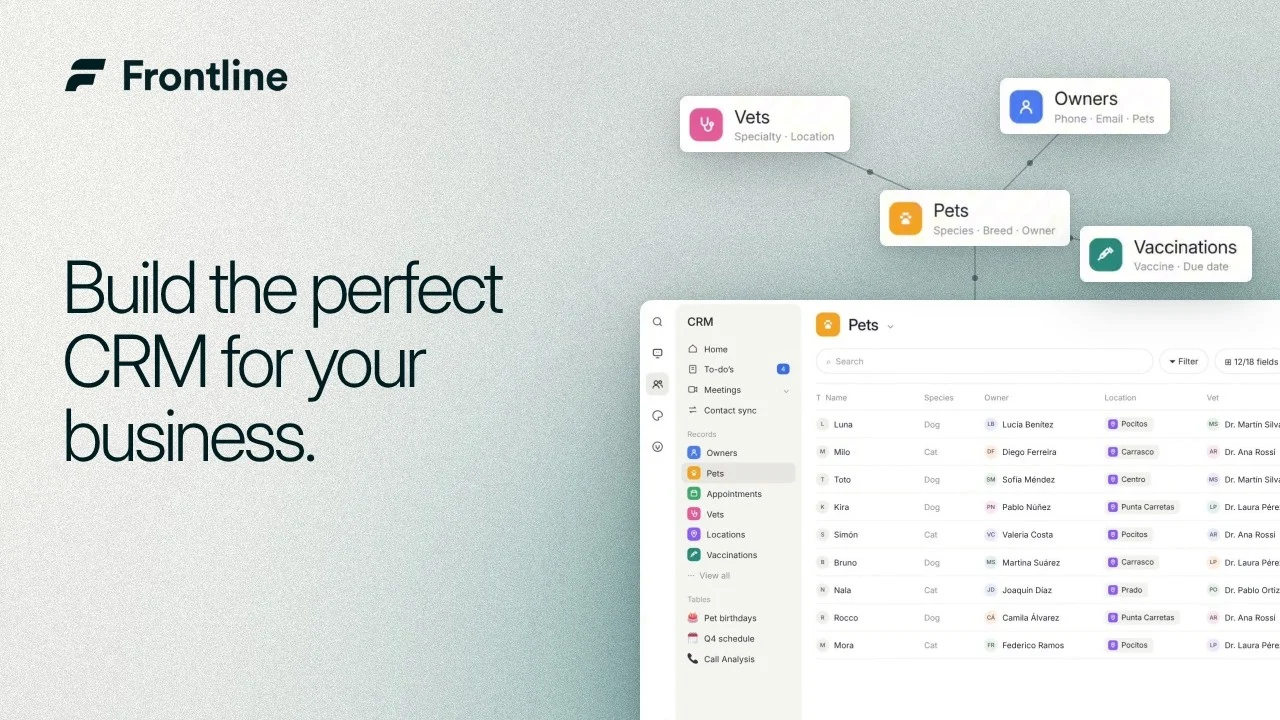
Step 1: Describe the business. The clinic opens Frontline and tells Max, its AI coworker, what it does: five locations, the vets at each one, the pets it treats, and the owners it bills. No template to pick and no fields to map. Plain language.
Step 2: Max maps the entities. Max turns that description into a data model: Locations, Pets, Owners, Vets, Appointments, and Vaccinations, plus the relationships between them. It picks up details a template would never include, like pet birthdays. Each pet links to its owner, its vet, and the location it visits.
Step 3: Review and adjust. The model is a draft you can edit. Fields can be text, numbers, currency, dates, selects, emails, phone numbers, URLs, formulas, or relationships to other objects. If the clinic wants to track each pet's insurance provider, or split appointments by type, it asks Max or edits the field directly.
Step 4: Connect your tools. Frontline has 50+ integrations, including Gmail, WhatsApp, Google Calendar, Slack, Stripe, Salesforce, and HubSpot, plus an API. The data your team already has starts flowing into the new model.
The result is a system of record built around how the clinic works. The front desk sees pets and appointments. Vets see their patients. The owner sees revenue by location. Nobody translates anything, and there's no consultant and no months of implementation between the idea and a working CRM.
Same platform, a completely different CRM
Now take a wealth management firm. Its CRM would look nothing like the clinic's.
The core object here is the household. A family might hold several accounts, work with two advisors, and share documents that every advisor needs to see. When a CRM only knows individual contacts, advisors lose the view that matters most: everything the family has with the firm, in one place. They rebuild it by hand before every review meeting.
So the firm describes its business and gets Households, Accounts, Advisors, and Documents, linked the way the firm works. Same platform. Different data model. Different CRM.
That's the whole point of a custom CRM. The software adapts to the business, instead of the business adapting to the software.
It matters most in industries built on long relationships, where the shape of the relationship is the business. In financial services, that's the household and its accounts. In healthcare, it's the patient and their care history. In insurance, it's the policyholder, their policies, and their claims. A generic contact record flattens all of that into a name and a phone number.
Every conversation should land on the record
A data model tells the CRM what to track. Interactions tell it what happened.
Once the CRM is ready, Frontline syncs every customer interaction to the right record: WhatsApp chats, emails, meetings, and conversations with your AI agents. Each one is logged, summarized, and added to an activity timeline that stays current on its own.
Back at the clinic, open the record for Lucía Benítez and you see her timeline. A booking handled by an AI agent on WhatsApp. A consultation for Luna with Dr. Martín Silva. An email reminding her that Luna's annual booster is due. A chat with the front desk. Open the WhatsApp thread and you can read exactly what was said, including her message that Luna has been scratching her ear since yesterday.
That detail matters. Most CRMs log that a call or a chat happened and stop there. The content of the conversation is where the context lives: the complaint, the objection, the thing the vet needs to know before the next visit.
Syncing also changes who keeps the CRM up to date. When interactions land on the record by themselves, nobody has to type notes after every call or paste chats into a contact. The record stays complete, and your team spends that time on the conversations themselves.
AI is only as useful as the context behind it
Anthropic, the company behind Claude, defines context as the set of tokens a model sees when it generates output. In its guide to context engineering for AI agents, it argues context should be treated as a finite resource, with diminishing returns as you add more. Put simply, a model can't reason about what it can't see, and dumping more data on it doesn't fix that. The right data, structured the right way, does.
That's why most AI in sales underdelivers. A chatbot added to a CRM with generic objects and incomplete records has little to work with. Every request starts with a briefing: who this customer is, what we sell, what happened last week.
Structure matters as much as volume. Ask an AI on top of a generic CRM how many appointments the Pocitos location had last month, and it has to guess which free text field holds the location, if any does. In a custom model, Appointments already link to Locations. The question has one right answer, and the AI can find it.
With a custom data model and every interaction synced, Max starts with the full picture. In the clinic example, the team can ask for:
- A monthly revenue report by location, built from appointment data.
- A dashboard of appointments by location and by vet that updates on its own.
- A landing page for the new clinic.
- A mobile app the front desk uses to check patients in.
Max builds each one as an Artifact: a dashboard, page, or app your team can open and share. Nobody explains what an appointment is, which vet works where, or how revenue is counted. The context is already there.
This is the move from system of record to system of intelligence. The CRM holds the business, and the AI on top of it can act on what it holds.
Map your business before you build
You don't need software to start. Sit down for 30 minutes with whoever runs operations and answer five questions.
- What are the nouns? List the things your team talks about every day. If people say "the household," "the policy," or "the property," those are objects.
- Which ones have a life of their own? Anything with its own stages, owner, or history deserves its own object. A field on a contact won't hold it.
- How do they connect? Write down the relationships and the counts: one owner to many pets, many advisors to many households.
- What do you need to know at each touch? These become your fields. Start with what drives a decision. Skip what nobody reads.
- Where do conversations happen? WhatsApp, email, calls, meetings. Every channel you leave out is context your AI won't have.
A few mistakes show up again and again. The first is copying your old CRM's fields into the new one. Many of them exist only because the old model had no better place for the data. The second is turning everything into an object. A vaccination deserves its own object if you track dates, batches, and reminders. If you only need to know whether a pet is up to date, a single field does the job. The third is designing for the report you want and forgetting the person who enters the data. If the front desk has to fill in twelve fields to book an appointment, they'll fill in three. Let the synced conversations fill in the rest.
Then bring that map to Frontline. Describe it to Max, review the CRM it builds, and connect the channels where your customers already talk to you. If you want to see the full flow first, browse the tutorials in Frontline Academy or book a demo with our team.
Sources
- Validity, The State of CRM Data Management in 2025
- Salesforce, State of Sales, sixth edition
- Gartner, Data quality: best practices for accurate insights
- HubSpot Knowledge Base, Create and edit custom objects
- Anthropic, Effective context engineering for AI agents