Most campaigns start with an export. Someone pulls a list out of the CRM, cleans it in a spreadsheet, uploads it to the email tool, and hits send. By the time replies come in, the list is already out of date, and the results live in a dashboard nobody connects back to the deal.
That splits what you know about each customer across two or more systems. In McKinsey's research on personalization, 71% of consumers said they expect companies to deliver personalized interactions, and 76% said they get frustrated when that doesn't happen. You can't personalize from a spreadsheet that forgot half of what your CRM knows.
Every export is a copy that starts going stale
The export and import loop looks harmless because each step is small. Filter the CRM. Download a CSV. Fix the columns. Upload it somewhere else. Map the fields again. Send. The problem is what the copy leaves behind.
The segment is only as smart as the columns you exported. If you didn't export last year's bookings, you can't target people based on last year's bookings. Most teams export name, email, and company, because that's what the email tool expects. Everything else the CRM knows stays behind.
The copy drifts the moment it leaves. A customer unsubscribes in one tool and stays subscribed in the other. A rep closes a deal on Tuesday, and the Thursday campaign still pitches that account the same offer. Consent, ownership, and status all change faster than anyone reexports.
Replies and results land in the wrong place. Replies go to a shared inbox. Clicks sit in the email platform. The rep who owns the account sees none of it, so the warmest leads from the campaign get the same follow up as everyone else, or none at all.
It also adds one more tool to a stack that's already crowded. In Salesforce's State of Sales research, nearly 70% of sales reps said they're overwhelmed by the number of tools they use, and nine out of ten sales organizations planned to consolidate their stacks. A campaign tool that lives outside the CRM is exactly the kind of tool reps don't open.
The fix is to run the campaign where the data already lives.
WhatsApp and email play by different rules
Before you build the campaign, pick the channel. They aren't interchangeable, and the differences change how you segment.
WhatsApp needs consent and templates. Meta requires businesses to get opt in before messaging people on WhatsApp. When a customer writes to you, it opens a 24 hour customer service window where you can reply freely. Outside that window, you can only send approved message templates, and every campaign message falls into that bucket. Templates are categorized as marketing, utility, or authentication, and Meta reviews them before you can send.
WhatsApp charges per message. Since July 1, 2025, Meta bills per delivered template message, with rates that depend on the template category, your volume tier, and the recipient's country. In practice, every person in a WhatsApp segment has a price. Sending a broad blast to your whole database costs real money and earns blocks from people who didn't need the message. A tight segment is cheaper and better received.
Email is cheap to send and hard to stand out in. Across Mailchimp's customers, the average email campaign gets a 35.63% open rate and a 2.62% click rate, and Business and Finance senders average 31.35% and 2.78%. The inbox is crowded, so relevance decides whether the email gets read.
A simple rule works for most teams. Use WhatsApp for short, time sensitive messages to people who already know you: a renewal date, an appointment slot, a price that expires Friday. Use email for content that needs room: a newsletter, a report, a proposal with photos. Many campaigns use both, with email carrying the content and WhatsApp nudging the accounts that clicked.
A full campaign, from draft to send
Take a corporate travel agency. It wants to fill its Q1 calendar early, so it plans a newsletter about early booking rates for corporate customers. Here's how that campaign runs in Frontline.
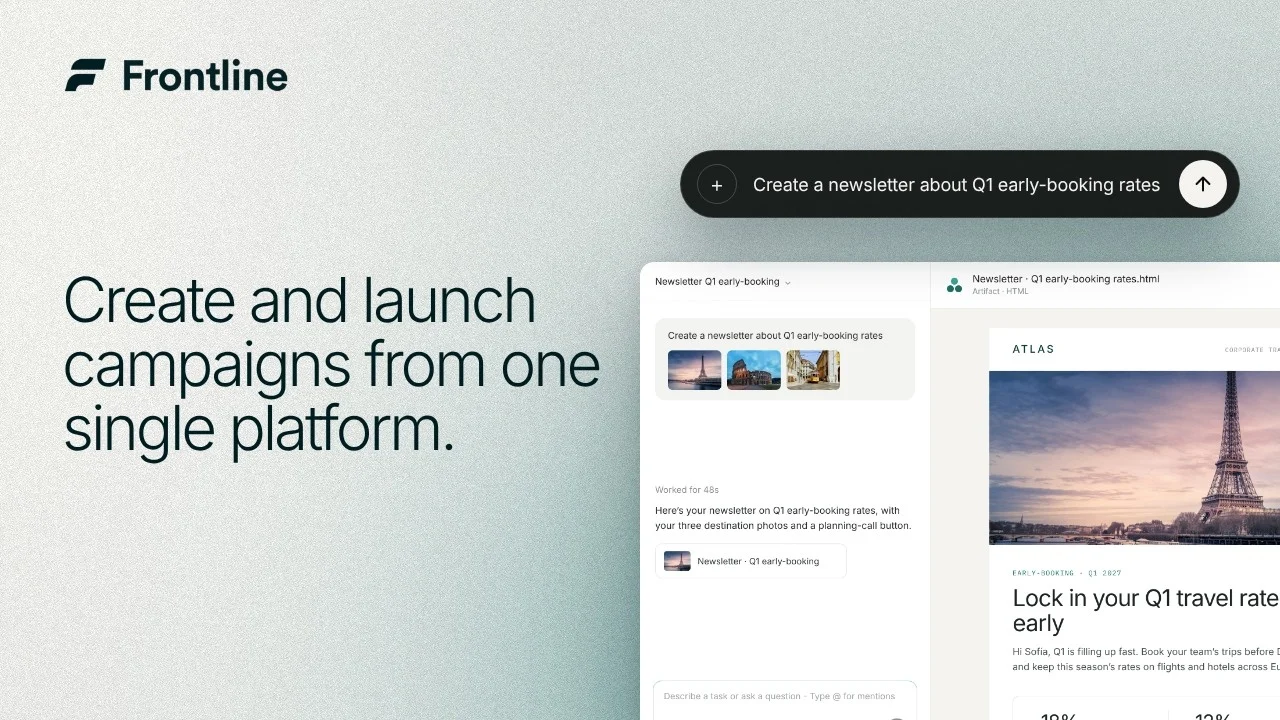
Step 1: Draft the content. The team asks Max, its AI coworker, for a newsletter about Q1 early booking rates and attaches a few photos. Max sends it back ready to review: headline, photos, the key numbers, and a button to book a planning call. If the agency has its brand loaded in Frontline, Max uses those colors, logos, and fonts without being asked.
Step 2: Set up the campaign. Name it, pick the channel (email or WhatsApp), and pick the type: marketing for promotions and offers, transactional for confirmations and service updates. This one goes by email.
Step 3: Build the audience. This is where the export usually happens. Here, the team asks Max for corporate accounts that booked trips to Europe last year and haven't booked for Q1 yet. Max builds the segment straight from the CRM and shows every company in it, the contact, their last trip to Europe, and the advisor who owns the account. Nothing gets downloaded or uploaded.
Step 4: Personalize and send. Select the newsletter Max drafted, or upload your own HTML. Write the subject line and drop in personalization fields like the contact's first name and the company name. Preview it as a real recipient would see it, then send.
Four steps, one place. The segment, the content, and the send all use the same data the sales team works from every day.
The best segments come from data your email tool never sees
Look at the segment again: corporate accounts that booked trips to Europe last year and haven't booked for Q1 yet. A standalone email tool can't build it. It would need account type, booking history, destinations, and dates, all linked to the right contacts. That data lives in the CRM, and it only stays useful if it's modeled around how your business works.
Write the segment as a sentence first. If you can say it, Max can build it. A few examples by industry:
- Insurance. Policyholders whose policy renews in the next 60 days and who haven't requested a quote.
- Private banking. Households that haven't met with their advisor in six months.
- Vet clinics. Pets due for an annual vaccine whose owners haven't booked an appointment.
- B2B software. Accounts that attended last month's webinar and have an open deal in the proposal stage.
Each one combines a trait (who they are) with a behavior (what they did or didn't do). That combination is what makes a message feel relevant instead of broadcast.
The same data powers personalization beyond the first name. You can mention the account's advisor, the destination they booked last year, or the policy that's about to renew. That's the kind of personalization McKinsey links to results: it found personalization most often drives a 10 to 15% revenue lift, and that companies that excel at it generate 40% more revenue from those activities than average players.
Relevance also protects the channel. On WhatsApp, people who get messages they don't care about can block you or stop marketing messages from your business. A smaller, sharper segment keeps your sender reputation intact for the next campaign.
Measure the call booked, and treat opens as a hint
Open rate is the first number every campaign report shows, and the least reliable one. Apple's Mail Privacy Protection loads email content in the background through proxy servers, which fires the tracking pixel whether or not anyone reads the email. Postmark, an email delivery provider, warns that senders see an artificially inflated open rate as a result. Use opens to spot a broken subject line. Don't use them to judge a campaign.
Clicks are a stronger signal, because someone had to act. The strongest signal is the outcome the campaign was built for. For the travel agency, that's planning calls booked. For an insurer, quotes requested. For a clinic, appointments scheduled.
In Frontline, the campaign dashboard shows the full chain: messages delivered, opens, clicks, and planning calls booked, plus calls broken down by advisor. The team doesn't have to open the dashboard to check, either. Anyone can ask Max on WhatsApp how the Q1 campaign is doing, and Max answers with the numbers and a link to the live dashboard.
Then comes the part a standalone tool can't do. Every action lands on each contact's record. Open the record for one of the recipients and the timeline shows it in order: she opened the email, clicked the button to plan her trips, and booked a planning call with her advisor. When the advisor gets on that call, they already know which email she read and what she clicked.
That's what turns a campaign into pipeline. The advisor can prioritize the accounts that clicked but didn't book. Sales can see which offer moved which segment. And the next campaign starts from a CRM that knows more than it did before the last one.
Run this checklist before your next send
Whatever tool you use, these six questions catch most of the problems before they cost you a list or a customer.
- What's the outcome? Pick the one number that means the campaign worked: calls booked, quotes requested, renewals signed. Decide it before you write a word.
- Can you say the segment in one sentence? Combine a trait and a behavior. If the sentence is "everyone," the segment is wrong.
- Do you have consent for this channel? Check opt in for every WhatsApp recipient and unsubscribes for every email recipient, at send time, against live data.
- Does the channel fit the message? Short and urgent goes to WhatsApp. Long and visual goes to email.
- What will you personalize beyond the name? Pick one field that proves you know the account: their advisor, their last order, their renewal date.
- Who follows up, and how fast? Decide which rep owns the accounts that click, and make sure they'll see it on the record the same day.
If answering any of these means exporting a spreadsheet, that's the loop worth breaking. In Frontline, campaigns live in Studio, next to your agents and workflows, and run on the same data as your CRM. Watch the full flow in Frontline Academy, or book a demo and bring your next campaign with you.
Sources
- McKinsey & Company, The value of getting personalization right, or wrong, is multiplying
- Salesforce, State of Sales research, 2023
- Meta for Developers, Get opt in for WhatsApp
- Meta for Developers, Pricing on the WhatsApp Business Platform
- Mailchimp, Email marketing benchmarks
- Postmark, Open tracking and Apple Mail (Mail Privacy Protection)